KI-Agent von Grund auf in Python erstellen: Anleitung mit der Anthropic API
Der Artikel erklärt, was ein KI-Agent ist, und zeigt Schritt für Schritt, wie sich ein eigener Agent in reinem Python über die Anthropic API aufbauen lässt.
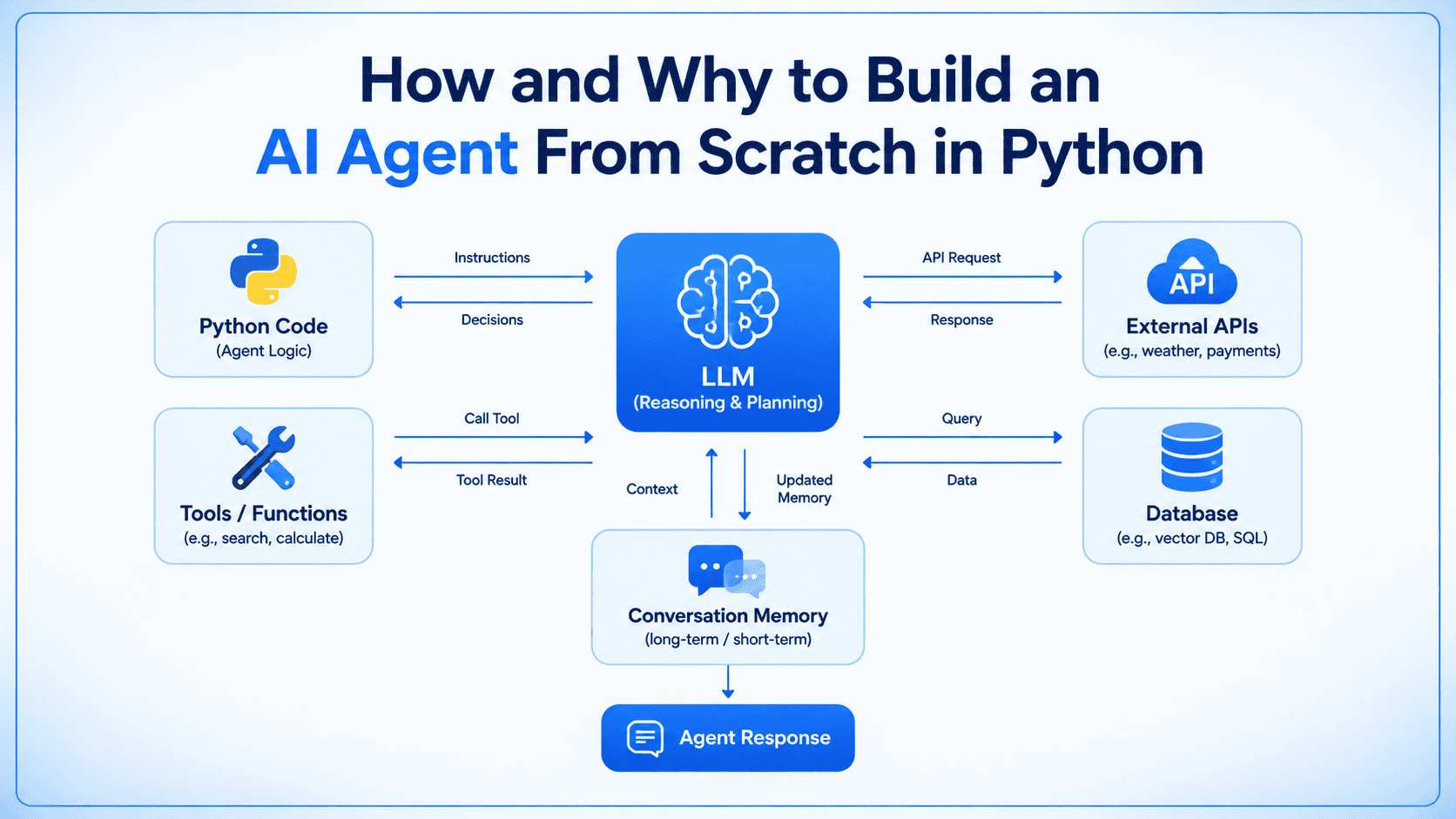
Beitrag teilen Teilen In diesem Artikel erfahren Sie, was ein KI-Agent ist und wie man einen von Grund auf in reinem Python unter Verwendung der Anthropic API erstellt, ohne auf ein Orchestrierungs-Framework zurückzugreifen.
Ein einfacher Aufruf eines großen Sprachmodells genügt, wenn die Antwort aus dem Wissen des Modells selbst erstellt werden kann: etwa das Erklären einer Richtlinie, das Verfassen einer Antwort oder das Zusammenfassen eines Textes. Nicht mehr ausreichend ist das, sobald die Antwort von Daten abhängt, die außerhalb dieses Trainingsdatensatzes liegen, etwa ein Live-Bestellstatus oder eine Zeile in Ihrer Datenbank. Genau diese Lücke ist es, die ein Agent zu schließen gebaut wird.
Ein KI-Agent ist das Ergebnis, wenn das Modell auf etwas anderes zugreifen kann, etwa eine Funktion, eine Datenbankabfrage oder eine API, und das Ergebnis verwendet, bevor es antwortet. Für den Anfang ist es ein vernünftiger Schritt, zu einem Agent-Orchestrierungs-Framework zu greifen, um das zum Laufen zu bringen.
Einen solchen Agenten von Grund auf in reinem Python mit einem rohen API-Aufruf zu schreiben, macht die zugrunde liegende Architektur deutlich. Im Kern gibt es einfach ein Modell, eine Schleife, die die Interaktion verwaltet, und eine kleine Menge klar definierter Funktionen, die dem Modell die benötigten Fähigkeiten geben. Wenn man die Frameworks und Abstraktionen beiseiteschiebt, wird es leichter zu sehen, wie diese Bausteine zusammenpassen und was tatsächlich unter der Haube passiert.
Den Begleitcode zu diesem Artikel finden Sie in diesem GitHub-Repository.
Sie benötigen Python 3.10 oder höher, einen Anthropic API-Schlüssel und das Anthropic Python SDK:
Legen Sie Ihren Schlüssel als Umgebungsvariable fest, damit der Client ihn ohne fest einprogrammierte Werte übernimmt:
Das ist alles, was Sie für den Einstieg brauchen. Den gesamten Code finden Sie im Skript agent.py.
⚠️ Ein Hinweis für Leser: Anthropic wird Claude Sonnet 4.5 offiziell am 30. November 2026 aus dem Ruhestand versetzen. Wenn Sie diesem Tutorial nach diesem Datum folgen, funktioniert der in diesen Beispielen verwendete spezifische Modellcode nicht mehr. Um sicherzustellen, dass Ihr Projekt reibungslos läuft, ersetzen Sie die Modellzeichenkette in den API-Aufrufen durch eine neuere Version oder das neueste verfügbare Modell.
Ein minimaler Wrapper um die API ist eine Funktion, die einen Prompt sendet und Text zurückgibt:
Das bewältigt einen großen Teil der Fragen gut, etwa das Erklären einer Richtlinie, das Verfassen einer Antwort oder das Zusammenfassen eines Absatzes. Es scheitert in dem Moment, in dem die Antwort von Daten abhängt, die dem Modell nie gezeigt wurden. Fragen Sie ask("What is the status of order #4471?"), und das Modell hat keinen Mechanismus, das zu prüfen: Diese Information liegt in Ihrer Datenbank, nicht in seinen Trainingsdaten. Es gibt entweder an, dass es es nicht weiß, oder liefert trotzdem eine plausibel klingende Antwort, und kein noch so guter Prompt ändert daran etwas, da kein Prompt dem Modell Zugriff auf Daten verschafft, die es nie erhalten hat. Tool Calling gibt dem Modell einen definierten Weg, diese Daten anzufordern, statt sie zu erschließen.
Lesen Sie The Roadmap to Mastering Tool Calling in AI Agents, um mehr zu erfahren.
Dem Modell Zugriff auf eine Funktion zu geben bedeutet, die Funktion zu schreiben und eine Beschreibung derselben zu verfassen, die das Modell lesen kann. Die Beschreibung ist wichtig, weil sie dem Modell sagt, was die Funktion tut und wann es darauf zugreifen soll.
Das Schema ist strukturierte Metadaten: ein Name, eine Beschreibung und eine Definition der Parameter, die die Funktion erwartet. Tool Use funktioniert bei den meisten Anbietern auf dieselbe Weise: Sie übergeben dem Modell zusammen mit Ihrer Nachricht eine Liste dieser Schemas, und das Modell entscheidet selbst, ob die Beantwortung der Frage den Aufruf eines davon erfordert.
Übergibt man das Schema, passiert etwas anderes. Statt einer schlichten Textantwort kommt die Antwort mit einem stop_reason von tool_use zurück und einem Inhaltsblock, der beschreibt, welche Funktion das Modell aufrufen möchte und mit welchen Argumenten. Das Modell hat noch nichts ausgeführt, es ist angehalten und hat eine Anfrage zurückgegeben, auf die Sie reagieren sollen.
Hier finden zwei Roundtrips statt. Der erste fragt das Modell, was es tun möchte. Sie führen die Funktion selbst aus, die Abfrage gegen orders_db oder in einem Produktionssystem ein Aufruf Ihres Bestelldienstes, hängen das Ergebnis als tool_result wieder an die Konversation an und senden alles erneut. Beim zweiten Roundtrip liest das Modell dieses Ergebnis und gibt Ihnen eine darauf fundierte Antwort statt einer Vermutung.
Dieses Muster verallgemeinert sich, sobald man aufhört, ein einzelnes Tool und einen einzelnen Roundtrip fest zu programmieren. Eine komplexere Frage benötigt möglicherweise zwei oder drei Tool-Aufrufe in Folge, etwa die Bestellung nachschlagen, dann die Tracking-API des Versanddienstleisters prüfen und dann eine Antwort formatieren, und Sie werden die Anzahl im Voraus nicht kennen. Statt also jeden Schritt auszuschreiben, laufen Sie in einer Schleife, bis das Modell aufhört, Tools anzufordern.
Das Limit max_iterations verhindert einen bestimmten Fehler: Ohne dieses Limit läuft ein Modell, das immer wieder entscheidet, dass es noch einen weiteren Tool-Aufruf braucht, in einer Schleife, bis Ihnen das Budget oder die Geduld ausgeht. Die Schleife zu begrenzen und eine klare Fallback-Meldung zurückzugeben ist eine kleine Codezeile, die Sie vor einem verwirrenden Vorfall in der Produktion bewahrt.
Löst man den umgebenden Code ab, ist dies die ganze Idee: ein Modell, eine Schleife und eine Reihe von Funktionen, die es Sie ausführen lassen kann. Nichts davon ist spezifisch für Bestellabfragen. Sie können einen Suchaufruf, eine interne API oder eine eigene Abfrage einsetzen, und dieselbe Schleife verarbeitet sie, solange das Schema sie klar beschreibt.
run_agent in der vorliegenden Form vergisst in dem Moment alles, in dem es zurückkehrt. Rufen Sie es zweimal hintereinander auf, zuerst mit einer Frage zur Bestellung #4471 und dann mit der Frage "und wann kommt sie an?", und der zweite Aufruf hat keine Ahne, worauf sich "sie" bezieht, denn jeder Aufruf baut eine völlig neue messages-Liste von Grund auf auf. Gedächtnis bedeutet hier, diese Liste zwischen den Aufrufen beizubehalten, statt sie zu verwerfen.
Der einfachste Weg dafür ist, die Nachrichten nicht jedes Mal neu zu übergeben, sondern sie stattdessen an einem Objekt zu speichern:
self.messages bleibt über mehrere Aufrufe von run() hinweg bestehen, sodass das Modell jedes Mal die gesamte Konversation sieht, einschließlich des früheren Tool-Aufrufs und seines Ergebnisses. Fragen Sie nach Bestellung #4471 und dann "und wann kommt sie an?", kann das Modell "sie" aus dem Verlauf auflösen, der bereits in self.messages liegt.
Das deckt das Gedächtnis innerhalb eines einzelnen laufenden Prozesses ab. Es deckt nicht ab, was passiert, wenn diese Liste das Kontextfenster des Modells überschreitet, oder was geschieht, wenn der Prozess neu startet und self.messages auf leer zurückgesetzt wird. Das sind echte Einschränkungen dieses Ansatzes, und sie sind der Grund, warum Produktionsagenten üblicherweise einen Schritt hinzufügen, der ältere Gesprächsrunden kürzt oder zusammenfasst, zusammen mit einem Ort, an dem die Konversation außerhalb des Prozesses selbst persistiert wird, etwa einer Datenbankzeile, einer Datei oder einem Cache-Schlüssel, der an eine Sitzungs-ID gebunden ist.
Was an diesem Punkt existiert, ist ein Modellaufruf, ein Tool-Schema, das eine Funktion beschreibt, eine Schleife, die Tool-Aufrufe ausführt, bis das Modell genügend Informationen hat, um zu antworten, und eine Klasse, die die Konversation über mehrere Runden hinweg aufbewahrt. Das ist ein funktionierender Agent, und jeder einzelne Baustein davon ist Code, den Sie selbst geschrieben haben und Zeile für Zeile nachlesen können.
Hier sind einige Richtungen, die es von hier aus zu erkunden lohnt:
Automatisch übersetzt. Das Original auf Englisch ist unten aufklappbar.
Original (Englisch) anzeigen
Share Post Share In this article, you will learn what an AI agent is and how to build one from scratch in plain Python using the Anthropic API, without relying on any orchestration framework.
A simple call to a large language model is enough when the answer can be produced from what the model already knows: explaining a policy, drafting a reply, summarizing text. It is not enough once the answer depends on data outside that training set, such as a live order status or a row in your database; this gap is what an agent is built to close.
An AI agent is what results once the model can call out to something else – a function, a database query, an API – and use the result before it answers. Reaching for an agent orchestration framework to get this working is a reasonable move, eventually.
Writing one from scratch in plain Python, using a raw API call, makes the underlying architecture clear. At its core, there is simply a model, a loop that manages the interaction, and a small set of well-defined functions that give the model the capabilities it needs. Stripping away the frameworks and abstractions makes it easier to see how these pieces fit together and what is actually happening under the hood.
You can find the companion code for this article in this GitHub repository.
You need Python 3.10 or later, an Anthropic API key, and the Anthropic Python SDK:
Set your key as an environment variable so the client picks it up without hardcoding it anywhere:
This is all you need to get started. You can find all the code in the agent.py script.
⚠️ A note to readers: Anthropic will officially retire Claude Sonnet 4.5 on November 30, 2026. If you are following this tutorial after that date, the specific model code used in these examples will no longer work. To ensure your project runs smoothly, replace the model string in the API calls with a newer version or the latest available model.
A minimal wrapper around the API is a function that sends a prompt and returns text:
This handles a large share of questions well — explaining a policy, drafting a reply, summarizing a paragraph. It fails the moment the answer depends on data the model was never shown. Ask ask("What is the status of order #4471?") and the model has no mechanism to check: that information lives in your database, not in its training data. It either states that it does not know, or produces a plausible answer anyway, and no amount of prompting changes that, since no prompt grants the model access to data it was never given. Tool calling gives the model a defined way to request that data instead of inferring it.
Read The Roadmap to Mastering Tool Calling in AI Agents to learn more.
Giving the model access to a function means writing the function, and writing a description of it that the model can read. The description matters because it tells the model what the function does and when to reach for it.
The schema is structured metadata: a name, a description, and a definition of the parameters the function expects. Tool use works the same way across most providers: you pass the model a list of these schemas alongside your message, and the model decides on its own whether answering the question requires calling one of them.
Pass the schema in, and something different happens. Instead of a plain text answer, the response comes back with a stop_reason of tool_use and a content block describing which function the model wants to call and with what arguments. The model has not run anything yet — it is paused, and has returned a request for you to act on.
Two round trips happen here. The first asks the model what it wants to do. You run the function yourself – the lookup against orders_db, or in a production system, a call to your order service – append the result back into the conversation as a tool_result, and send everything again. The second round trip is where the model reads that result and gives you an answer grounded in it, instead of a guess.
This pattern generalizes once you stop hardcoding a single tool and a single round trip. A more complex question might need two or three tool calls in sequence – look up the order, then check the shipping carrier’s tracking API, then format a reply – and you will not know the number in advance. So instead of writing out each step, you loop until the model stops asking for tools.
The max_iterations cap prevents a specific failure: without it, a model that keeps deciding it needs “one more” tool call will loop until you run out of budget or patience. Capping the loop and returning a clear fallback message is a small line of code that saves you from a confusing incident in production.
Strip away the surrounding code and this is the whole idea: a model, a loop, and a set of functions it can ask you to run. Nothing here is specific to order lookups. You can swap in a search call, an internal API, or a query of your own, and the same loop handles it, as long as the schema describes it clearly.
run_agent as written forgets everything the moment it returns. Call it twice in a row – first asking about order #4471, then asking “and when will it arrive?” – and the second call has no idea what “it” refers to, because each call builds a brand new messages list from scratch. Memory here means keeping that list around between calls instead of discarding it.
The simplest way to do that is to stop passing messages in fresh each time and start keeping it on an object instead:
self.messages persists across calls to run(), so the model sees the full conversation each time, including the earlier tool call and its result. Ask about order #4471, then ask “and when will it arrive?”, and the model can resolve “it” from the history already sitting in self.messages.
This covers memory within a single running process. It does not cover what happens once that list grows past the model’s context window, or what happens if the process restarts and self.messages resets to empty. Those are real constraints of this approach, and they are the reason production agents usually add a step that trims or summarizes older turns, along with a place to persist the conversation outside the process itself – a database row, a file, a cache key tied to a session ID.
What exists at this point is a model call, a tool schema describing a function, a loop that executes tool calls until the model has enough information to answer, and a class that keeps the conversation across turns. That is a working agent, and every piece of it is code you wrote and can read back line by line.
Here are a few directions worth exploring from here: